
A few weeks ago I was in Hong Kong for a week and met a friend at a coffee shop in Central. Within ten minutes of sitting down, our conversation turned to a problem almost everyone working in an office there seems to have right now: where your actual thinking is supposed to live when using AI.
Her company had rolled out an internal AI portal earlier this year. On paper, everyone had access. In practice, she barely touched it for real work. The internal tool felt stiff compared to frontier models, and every prompt was logged under strict compliance monitoring. She was not going to paste half-baked product thoughts, career notes, or personal documents into a window her IT department audited.
Outside the office laptop, her default used to be Poe. Almost everyone I know in Hong Kong had a Poe phase. Then it slowly became harder to live in. There was no real memory carrying across custom setups, switching models mid-problem meant losing the thread of the conversation, and the pricing kept creeping up for anyone doing daily work.
By the time our coffee arrived, we had counted four different apps between her laptop and her phone, none of which knew what the other three were doing.
I do not live in Hong Kong, so I do not deal with the city's regional blocks day to day. Sitting across from her, though, it was obvious that almost nobody in Hong Kong uses just one AI tool anymore. Everyone is running a patchwork.
Why Everyone in Hong Kong Is Piecing Together Their AI Stack
In most cities, people pick a default chatbot and stay there until something breaks. In Hong Kong, the ground shifts every few months, so people learn to hedge. Looking at what friends were using and what local traffic data actually shows, five things are shaping that patchwork.
1. People are quietly moving on from Poe's 300-point daily cap
For over a year, Poe was the default answer in Hong Kong whenever someone wanted multiple models under one login. According to HKT Enterprise's May 2025 ranking, Poe was the third most visited generative AI platform in the city with 345,000 monthly visits.
That relationship changed in the spring of 2026. On March 30, 2026, Poe cut its free daily allowance by 90 percent, dropping from 3,000 points to 300 points a day, a change widely covered by Ming Pao and eZone. Two months later, in May 2026, the platform retired its Knowledge Base feature. Even on paid tiers, people who wanted to upload project documents, switch models on the same problem, and keep persistent memory found themselves hitting structural limits. The traffic tells the same story: in HKT Enterprise's May 2026 ranking, Poe had slipped from third to seventh, with 92,000 monthly visits.
2. Google Gemini has become the easy default
Right as Poe tightened its limits, Google officially launched the Gemini mobile app in Hong Kong on March 26, 2026, as reported by the South China Morning Post. Because it plugs straight into Gmail and Google Docs, Gemini became the frictionless fallback. One local user on Threads summed it up: Poe's free plan went from 3,000 points to 300, and they were glad they had already moved to Gemini.
Personally, I actually like how Gemini talks, and its breadth of general knowledge is solid. I even wrote a separate note on testing Gemini's recent hedging behavior. Still, on complex product structuring, nuanced editing, or multi-step reasoning, I often find it the weakest of the major frontier families. It works well as a quick assistant, which is why people who rely on it still end up opening a second tool when a task gets hard.
3. DeepSeek and local Hong Kong options are part of the daily mix
DeepSeek has no regional friction in Hong Kong and holds second place in local usage with 666,000 monthly visits in HKT Enterprise's 2026 ranking. At the same time, the city has been building its own public infrastructure. Civil servants began using the DeepSeek-based HKGAI V1 system (SCMP), and the consumer-facing HKChat app drew 90,000 users in its first week after launching in November 2025 (SCMP).
4. Regional blocks and sudden account suspensions are a real tax
The reason the conversation in Central felt so urgent is that availability in Hong Kong is never guaranteed. OpenAI has never officially offered ChatGPT in Hong Kong, and in July 2024 it started blocking API access from the city as well (SCMP). In April 2026, the Financial Times reported that Goldman Sachs stopped its Hong Kong bankers from using Claude. Then, starting October 1, 2026, a wave of sudden account suspensions hit individual Claude users across Hong Kong (SCMP).
5. Even telecom plans have turned AI access into an add-on
Nothing sums up the Hong Kong AI landscape better than looking at mobile carrier bills. SmarTone sells an "AI Connect" value-added service from HK$28 a month, and HKT partnered with Perplexity to bundle 12 months of Perplexity Pro for eligible mobile and broadband customers. Even getting to the tools has become its own subscription category.
The Real Cost Is Not the Subscription Fee. It Is Losing Your Context.
Listening to my friend describe her daily routine, it struck me that the subscription cost was only half the annoyance. The real exhaustion was starting from zero every morning.
Every time you jump between a company portal, a mobile app, and two browser tabs, you pay a context tax:
- You have to re-explain who you are, what role you play, and how you want the output formatted.
- When you switch from one AI engine to another to get a second opinion, the conversation history and uploaded files stay trapped in the previous bot.
- Reference documents get scattered across four different chat histories.
- If an account gets suspended or a platform deletes its file feature, six months of accumulated project context disappears overnight.
Most people in Hong Kong think they are shopping for a way around tool limits. What they actually need is a stable place for their work to live when models and policies shift.
What I Showed My Friend on My Laptop (and Why It Beats Standard Native Apps)
Halfway through our coffee, I opened my laptop and showed her how I actually run my daily work. When I moved off Poe myself earlier this year, I switched to HaloMate.
As I walked her through it, I honestly found myself wondering why almost nobody in Hong Kong seems to know about it yet. On the surface, it is a much cleaner Poe replacement for anyone who wants multiple frontier models in one place. In practice, once you use it for real projects, it solves several structural problems that even official single-vendor apps still get wrong:
1. Switching engines mid-conversation without losing the thread
On Poe, or when jumping between separate native apps, asking a second model for its take usually means starting a new chat or losing your custom setup. In HaloMate, my assistants (called Mates) are decoupled from the underlying AI engine. A Mate holds my role instructions and communication rules. If an answer feels too stiff or too agreeable, I click regenerate on the last reply and pick a different model engine. The conversation history, the persona, and the attached project files stay right where they are. That makes getting a genuine second opinion across models a two-second habit instead of a copy-paste chore.
2. Memory you can actually inspect and edit
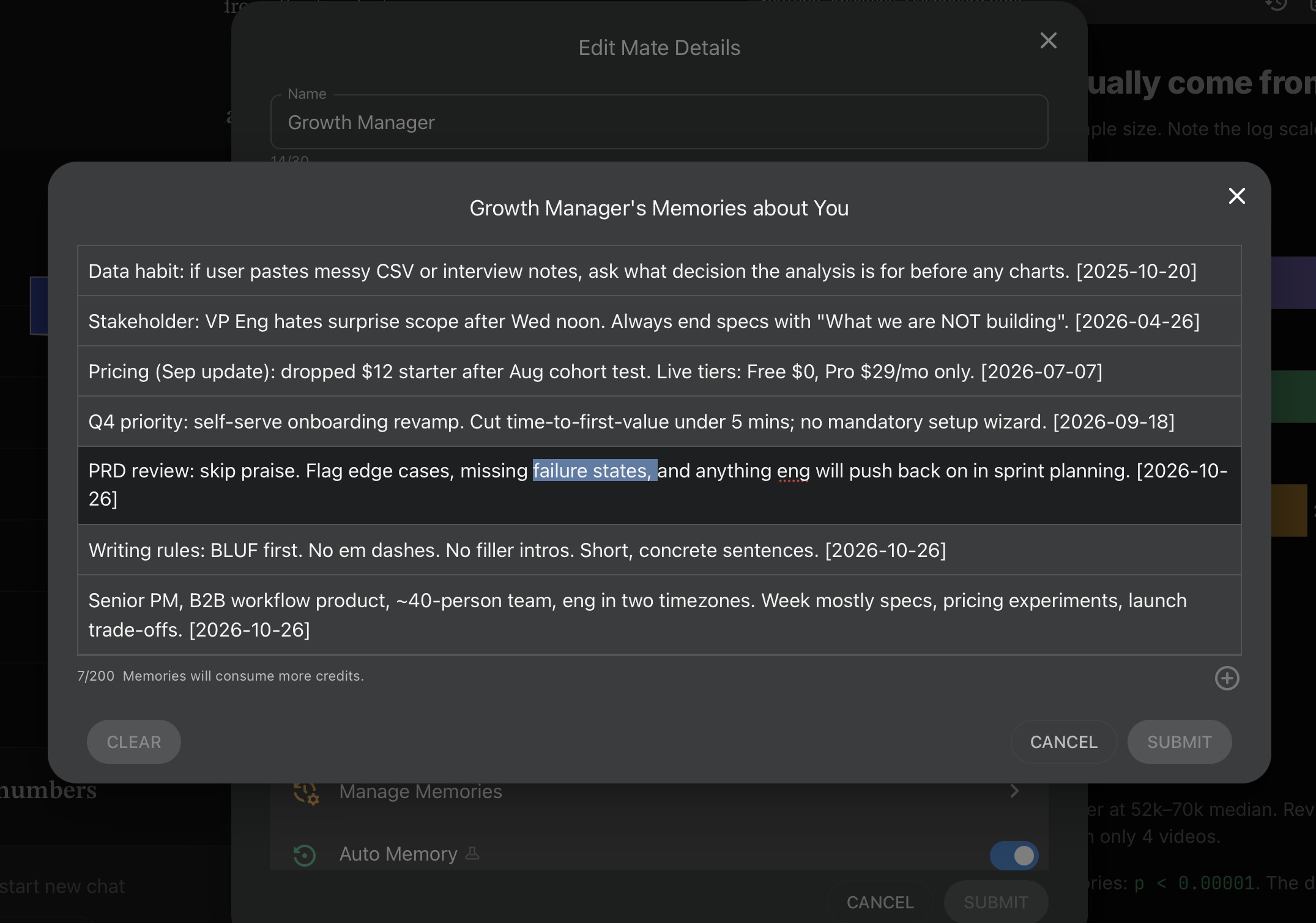
Native chat tools either suffer from amnesia in every new thread or maintain a black-box memory that quietly remembers the wrong detail from a month ago. In my setup, whenever a working session wraps up, I can extract the key takeaways into that Mate's memory list. More importantly, I can open the memory drawer anytime, read every bullet point it knows about me, and rewrite or delete a line when a project changes.
3. Project folders with exact file retrieval, not just single-chat uploads
Instead of one endless scroll of chats, my workspace is organized into separate Projects for different parts of my life:
- Product & Day-to-Day Work: Where specs, research notes, and drafts live, so multiple Mates can review the same documents from different angles (I wrote a full breakdown of how I structure an AI workspace for product managers).
- Side Ideas & Research: Where market numbers and rough concepts stay isolated while validating business ideas with AI.
- Personal & Family Archives: The exact kind of private material my friend refused to put into her company's monitored AI, such as organizing years of PDFs for family medical records and checkup history.
Unlike standard RAG in many native tools that paraphrases chunks and misses specific numbers, files uploaded to a Project use exact retrieval. Every Mate inside that project can pull the exact sentence or table from a 50-page PDF months later without me re-uploading a thing.
4. In-chat deliverables and writing edits instead of endless re-prompting
In most chat apps, changing one paragraph in a draft or fixing a box in a diagram means burning another prompt and hoping the AI does not rewrite the parts you liked. Here, I can open drafts in a side-by-side writing editor to tweak lines directly, or generate architecture diagrams (.drawio and SVG) right inside the chat where I can drag nodes and edit labels by hand for zero credits, and the AI reads my manual edits right back.
When You Do Not Need a Setup Like This
As much as my friend liked the setup, a long-term workspace is not necessary for everyone:
- If you only ask quick, one-off questions like translating an email, summarizing an article, or checking grammar, the free tier of Google Gemini or your company's internal portal is plenty.
- If what you loved about Poe was browsing thousands of community-made character bots, HaloMate is not built for that. It is a quiet desk for your own projects, not a public bot mall.
- If you are handling strictly regulated company data that cannot leave your employer's intranet, keep that work inside the corporate tool, no matter how clunky it feels, and keep a personal workspace strictly for your own thinking, learning, and personal files.
A Note on the Cantonese Version of This Post
Right before I headed to Hong Kong Station to catch the Airport Express, my friend looked at my screen and said, "You should write this down for people here, and you should write it in Cantonese."
Well, I do not speak Cantonese. I was mildly terrified of what would happen if I tried, though I suspected my AI assistant might actually pull it off. So I drafted this English version on the flight back first, then handed it over to a Mate tuned for Hong Kong Cantonese (complete with Central office slang) to localize the whole piece.
If you read Cantonese, or want to send it to a friend in Hong Kong who is tired of juggling four AI tabs, you can check how the assistant did right here. If you are a native speaker and any of the words sound funny to you, I apologize. Please let me know and I will go train my localization Mate, haha.
I write field notes on how I actually use AI at work: workflows, experiments, and what breaks. More at angied.me or on Medium.